Pytesseract
Python OCR Engine for Image to Text Extraction
Pytesseract is a powerful Python wrapper for Tesseract OCR that enables developers to extract text from images, scanned documents, and screenshots with high accuracy and minimal configuration.
What is Pytesseract?
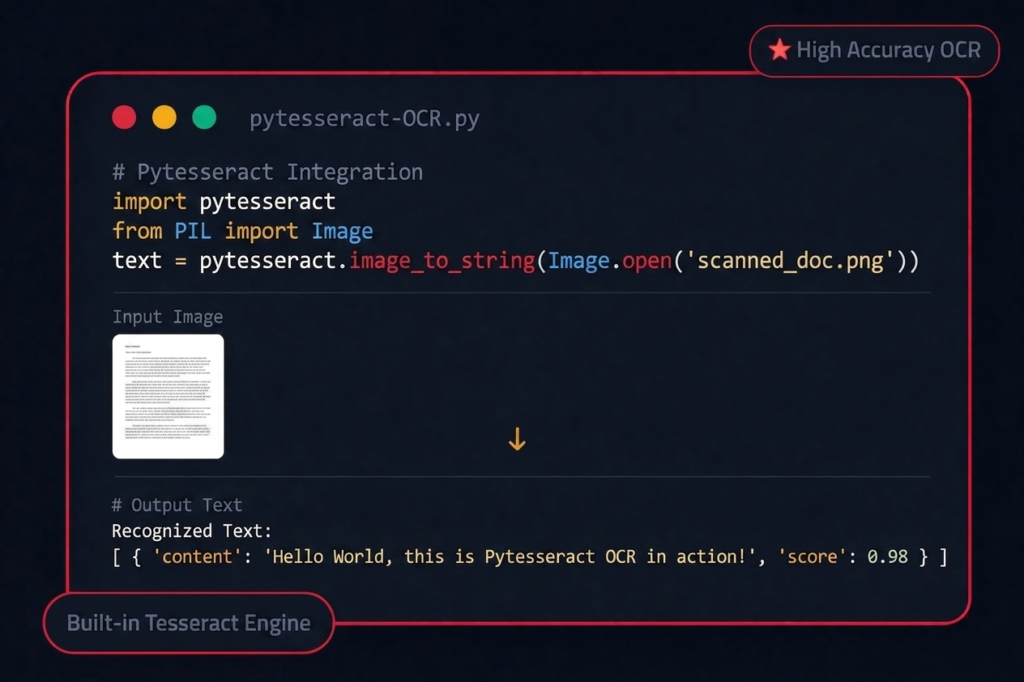
Pytesseract is a Python-based wrapper for the Tesseract OCR engine that enables developers to extract text from images and scanned documents with high accuracy. It acts as a bridge between Python applications and OCR functionality, allowing seamless conversion of visual content into machine-readable text for automation, data extraction, and document processing systems.
Pytesseract works seamlessly within the Python ecosystem, developers can integrate OCR functionality directly into workflows involving OpenCV image preprocessing, PDF text extraction, screenshot analysis, and structured data parsing. Its compatibility with multiple operating systems and support for offline execution further strengthens its position as a dependable OCR library for Python developers who require secure and customizable text-recognition solutions.
Open Source
Pytesseract is completely free and open-source, licensed under Apache 2.0. It benefits from an active community of developers contributing improvements, bug fixes, and new features. You can inspect the source code, modify it for your needs, and contribute back to the project on GitHub.
Easy to Use
With just three lines of Python code, you can extract text from any image. Pytesseract abstracts away the complexity of the Tesseract C++ API, giving you a clean Pythonic interface. No need to deal with binaries, pipes, or temp files import, call, and get your text instantly.
100+ Languages
Out of the box, Tesseract supports over 100 languages including English, Spanish, French, German, Chinese, Japanese, Arabic, Hindi, and many more. You can also train custom models for specialized fonts, domain-specific terminology, or even historical scripts not covered by default.
Powerful Features
Everything You Need for OCR
Experience reliable OCR performance that accurately converts images into clean, editable text with speed, precision, and consistent results across documents, screenshots, and scanned files.
Image to Text Conversion
Extract plain text from images using accurate Python OCR powered by Pytesseract and Tesseract. Ideal for processing scanned documents, screenshots, and image-based datasets efficiently.
PDF Output
Generate searchable PDF files from scanned images with embedded selectable text layers. Perfect for document archiving, indexing, and building searchable digital libraries.
Custom Config
Adjust OCR behavior using custom Tesseract parameters like PSM and OEM modes. Optimize recognition accuracy for single lines, paragraphs, or full-page layouts.
Bounding Boxes
Retrieve precise coordinates for characters, words, and text lines from images. Useful for layout detection, text overlays, and region-based OCR applications.
Multi-format Output
Export OCR results in structured formats like HOCR, TSV, and ALTO XML. Preserve layout structure, confidence scores, and positional metadata easily.
Batch Processing
Process large collections of images automatically using scalable Python OCR workflows. Ideal for directory scanning, automation scripts, and bulk document processing.
OpenCV Integration
Combine OpenCV preprocessing with Pytesseract for improved OCR accuracy. Enhance images before recognition for better detection results in pipelines.
Offline Processing
Run OCR locally without internet or cloud API dependencies for secure processing. Best suited for privacy-sensitive automation systems and internal workflows.
Multi-Language Support
Extract text from images in multiple languages using Tesseract language models. Great for multilingual datasets, invoices, research archives, and global workflows.
Benefits
Why Developers Choose
Pytesseract
Save Hours on Data Entry
Eliminate manual transcription by automatically extracting text from scanned documents, receipts, and forms. What used to take hours now takes seconds.
Automate Document Processing
Build automated pipelines that process thousands of documents daily. From invoice parsing to contract analysis, Pytesseract handles it all.
Boost Team Productivity
Free your team from repetitive tasks. Let Pytesseract handle text extraction while your developers focus on building innovative features.
Seamless Python Integration
Drop Pytesseract into any existing Python project with a simple pip install. Works with Flask, Django, FastAPI, and standalone scripts.
Zero Licensing Costs
Completely open-source with no usage limits, API fees, or subscription costs. Scale your OCR operations without worrying about the bill.
Compatibility
Runs on Every Platform
Windows
Windows 7+ supported. Install via .exe installer or chocolatey package manager. Seamless setup with quick installation and automatic updates for hassle-free usage.
Linux
Ubuntu, Debian, Fedora, Arch install via apt, yum, or compile from source. Optimized for server environments and developer workflows with high performance.
macOS
macOS 10.13+. Install with Homebrew: brew install tesseract. M1/M2 compatible. Smooth integration with Apple Silicon ensuring fast and stable OCR performance.
Installation
| Step | Title | Command / Details |
|---|---|---|
| 1 | Install Tesseract OCR Engine |
Ubuntu/Debian:sudo apt install tesseract-ocr
macOS: brew install tesseract
Windows: Tesseract OCR Source Code Installer |
| 2 | Install Pytesseract via pip |
pip install pytesseract
|
| 3 | Install Pillow for Image Handling |
pip install Pillow
|
| 4 | Verify Installation |
python -c "import pytesseract; print(pytesseract.get_tesseract_version())"
|
Get Pytesseract
Choose your preferred method to install Pytesseract and start extracting text from images today.
v0.3.13
Python 3.7+
MIT License
Tesseract 4+
Troubleshooting
Common Issues & Fixes
TesseractNotFoundError: tesseract is not installed or it's not in your PATH
Ensure Tesseract OCR is installed on your system and the executable is in your system PATH. On Windows, add C:\Program Files\Tesseract-OCR to your PATH environment variable. On macOS, install via ‘brew install tesseract’. On Linux, use ‘sudo apt install tesseract-ocr’.
Error opening data file ./tessdata/eng.traineddata
The language data files are missing. Set the TESSDATA_PREFIX environment variable to point to the tessdata directory, or reinstall Tesseract with language packs: ‘sudo apt install tesseract-ocr-eng’.
Output is empty or garbled text
This usually means the input image quality is too low. Try preprocessing: convert to grayscale, increase contrast, resize to at least 300 DPI, and remove noise. Use OpenCV’s threshold and blur functions before passing to Pytesseract.
Permission denied when accessing Tesseract
Check file permissions on the Tesseract binary. On Linux/macOS, run ‘chmod +x /usr/bin/tesseract’. On Windows, run your IDE or terminal as administrator.
Slow processing on large images
Resize images before processing — OCR doesn’t need ultra-high resolution. Crop to regions of interest. Use pytesseract.image_to_string with config=’–psm 6′ for uniform text blocks to speed up recognition.
Process
How Pytesseract Works
Input Image
Load virtually any image containing readable text, including scanned documents, mobile camera photos, screenshots, receipts, forms, and PDFs converted into image format. Pytesseract works seamlessly with popular formats such as PNG, JPEG, TIFF, BMP, GIF, and WebP through Pillow (PIL) support, making it ideal for both single-image and batch OCR workflows.
OCR Processing
Tesseract’s advanced LSTM-based neural network engine analyzes the visual structure of characters by detecting glyph shapes, spacing patterns, and contextual relationships between symbols. It intelligently converts pixel-level information into machine-readable Unicode text while supporting multiple languages and complex layouts for accurate recognition results.
Text Extraction
After recognition, the OCR engine reconstructs the detected content into structured text while preserving paragraph flow, line breaks, and reading order wherever possible. This layout-aware extraction improves usability for real-world tasks such as document digitization, searchable archives, automated data pipelines, and structured content processing.
Output String
The final result is returned as a clean and ready-to-use Python string that can be directly integrated into downstream workflows like Natural Language Processing (NLP), keyword indexing, database storage, automation scripts, machine learning pipelines, or intelligent search systems — reducing manual effort and improving productivity.
FAQ’s
Frequently Asked Questions
What is Pytesseract?
Pytesseract is a Python wrapper for Google’s Tesseract-OCR engine. It allows you to extract text from images using simple Python function calls, making OCR accessible to any Python developer.
Is Pytesseract free to use?
Yes. Pytesseract is completely open-source and licensed under the MIT license. You can use it for personal, educational, and commercial projects without any fees.
Who maintains Pytesseract?
Pytesseract is maintained by the open-source community on GitHub. Contributions are welcome from developers worldwide.
What is OCR?
OCR stands for Optical Character Recognition. It’s a technology that converts different types of documents — such as scanned paper documents, PDF files, or images taken by a camera — into editable and searchable text data.
How accurate is Pytesseract?
Accuracy depends on image quality, font type, and preprocessing. With clean, high-resolution images and proper preprocessing (thresholding, denoising), Pytesseract can achieve 95%+ accuracy on printed text.
What image formats does Pytesseract support?
Pytesseract supports JPEG, PNG, TIFF, BMP, GIF, and WebP formats. Any format supported by the Pillow (PIL) library can be used as input.
Can Pytesseract recognize handwritten text?
Pytesseract has limited support for handwriting recognition. It works best with printed text. For handwritten text, consider combining it with specialized ML models or using Tesseract’s LSTM training capabilities.
Does Pytesseract support multiple languages?
Yes. Tesseract supports over 100 languages. You can specify the language using the lang parameter: pytesseract.image_to_string(image, lang=’fra’) for French, for example.
Can I extract text from specific regions of an image?
Yes. Use image_to_boxes() or image_to_data() to get bounding box coordinates for each recognized character or word. You can also crop the image before processing.
Does Pytesseract preserve text formatting?
Pytesseract attempts to preserve basic layout structure. For more detailed layout preservation, use image_to_data() with output_type=Output.DICT to get positional data for each text element.
Which Python versions are supported?
Pytesseract supports Python 3.7 and above. It is regularly tested against Python 3.8, 3.9, 3.10, 3.11, and 3.12.
Does Pytesseract work on all operating systems?
Yes. Pytesseract works on Windows, macOS, and Linux. You need to install the Tesseract OCR engine separately for your specific OS.
Can I use Pytesseract in a Docker container?
Absolutely. Many developers run Pytesseract in Docker. You’ll need to install Tesseract in your Dockerfile: RUN apt-get update && apt-get install -y tesseract-ocr.
Is Pytesseract compatible with Django and Flask?
Yes. Pytesseract can be integrated into any Python web framework including Django, Flask, FastAPI, and Streamlit for server-side OCR processing.
Does it work with cloud services like AWS Lambda?
Yes, but you’ll need to include the Tesseract binary and language data in your deployment package or use a Lambda layer that includes Tesseract.
How do I install Pytesseract?
Install the Python package with ‘pip install pytesseract’. You also need to install the Tesseract OCR engine on your system — see the installation section above for OS-specific instructions.
Do I need to install Tesseract separately?
Yes. Pytesseract is a wrapper it requires the Tesseract OCR engine to be installed on your system. The Python package alone won’t work without it.
How do I set the Tesseract path on Windows?
Set it in your Python code: pytesseract.pytesseract.tesseract_cmd = r’C:\Program Files\Tesseract-OCR\tesseract.exe’ — or add the directory to your system PATH.
Can I install Pytesseract in a virtual environment?
Yes. The Python package installs fine in venvs and conda environments. Just remember that the Tesseract binary must be installed system-wide or its path must be specified.
How do I install additional language packs?
On Ubuntu: ‘sudo apt install tesseract-ocr-[lang]’ (e.g., tesseract-ocr-deu for German). On macOS: ‘brew install tesseract-lang’. On Windows, select languages during the Tesseract installer.
Why is Pytesseract returning empty strings?
Common causes: image quality is too low, wrong page segmentation mode, or the image needs preprocessing. Try converting to grayscale, increasing contrast, and using ‘–psm 6’ for block text.
How do I fix 'TesseractNotFoundError'?
Tesseract isn’t in your system PATH. Install Tesseract and either add it to PATH or set pytesseract.pytesseract.tesseract_cmd to the full path of the tesseract executable.
Why is OCR accuracy low on my images?
Preprocess images: resize to 300+ DPI, convert to grayscale, apply binary thresholding (cv2.threshold), remove noise (cv2.GaussianBlur), and deskew rotated text.
Can I improve speed for batch processing?
Yes. Use multiprocessing to parallelize OCR across images. Also resize images to reasonable dimensions — ultra-high-res images slow down processing without improving accuracy.
How do I handle multi-column layouts?
Use ‘–psm 1’ for automatic page segmentation with OSD, or ‘–psm 3’ for fully automatic segmentation. For complex layouts, consider segmenting columns manually before OCR.
Testimonials
Loved by Developers